JAMB Change of Course, Institution, or Data (2026 Update)
How to Change Your JAMB Course, Institution, or Data in 2025: Step-by-Step Guide
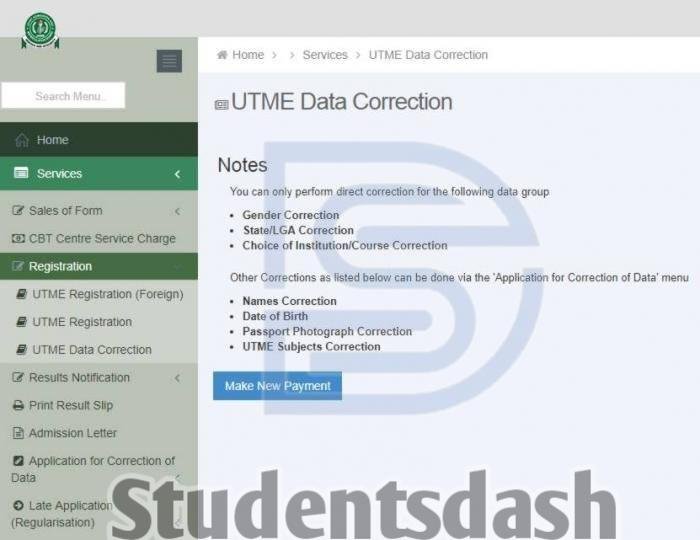
It happens to the best of us you check your JAMB slip and suddenly notice something is off. Maybe your name is spelled wrong, you picked the wrong course, or you simply changed your mind about the school you want to attend. Good news? JAMB allows corrections. The not so good news? Some fixes can only be done once, so you have to be careful.
Studentsdash is here to guide you through what you can change, how to do it, and how much it costs so you can fix mistakes without stress.
What Can You Change on the JAMB Portal?
Here’s a breakdown of the main data you can correct:
- Name – Wrong spelling? Mixed up names? You can correct your surname, first name, or middle name once. Double – check before saving.
- Date of Birth – Mistakes happen. You can fix it once.
- Passport Photograph – If your picture doesn’t look like you, you can update it, but you only get one chance.
- Gender – Picked the wrong gender? JAMB allows changes, but you may need documents like a birth certificate or affidavit.
- State or Local Government Area (LGA) – If you were listed under the wrong state or LGA, update it with proof.
- Profile Details – Mistyped your email or phone number? Fix it once.
- Course or Institution – Changed your mind about the school or course? You can do this more than once, but each change comes with a fee.
Many students change their choices multiple times to improve admission chances. Just make sure you plan wisely trial and error is expensive.

How Much Will It Cost?
Every correction whether it’s your name, date of birth, gender, course, or institution costs ₦3,500, which includes the CBT centre’s service fee. It’s not much individually, but money is money, so think carefully before making multiple changes.
How to Correct Your JAMB Data (2026 Guide)
Here’s the step-by-step Studentsdash-approved method:
- Visit the JAMB eFacility portal.
- Log in using your email and password.
- On the menu, click “Registration (2026 only)”.
- Select “2026 UTME Data Correction” or “2026 DE Data Correction” (for Direct Entry applicants).
- Make the ₦3,500 payment online.
- Visit a nearby JAMB office or accredited CBT centre to complete the process.
Note: Some corrections can’t be completed online alone.
What If You Registered in 2024 or Earlier?
No worries. The steps are slightly different:
- Log in to the JAMB eFacility portal.
- Select “Application for Correction of Data (2026 Downward)”.
- Pick the details you want to change course, institution, name, birth date, etc.
- You may still need to visit a JAMB office for the final step.
Final Thoughts
Mistakes happen but the great news is, they can be fixed. Don’t delay. JAMB doesn’t wait forever, and schools start considering candidates once the portal opens.
A few tips from Studentsdash:
- Choose wisely when changing your course or institution. Do your research and seek advice.
- Avoid scammers. Only use approved JAMB centres or offices. Never pay anyone on the street to fix your data.
- Act quickly if something is wrong. A small typo can block your chance of getting into your dream school.
You’ve already done the hard part by writing JAMB. Now, make sure your information matches who you really are, and secure your admission properly.