What to Do If You See “You Have an Unapproved Loan” While Applying for NELFUND Loan
Follow Studentsdash
Get the latest admission updates, school news, NELFUND information, scholarships and important announcements directly on Telegram and WhatsApp.
Stay connected so you don’t miss important student updates.
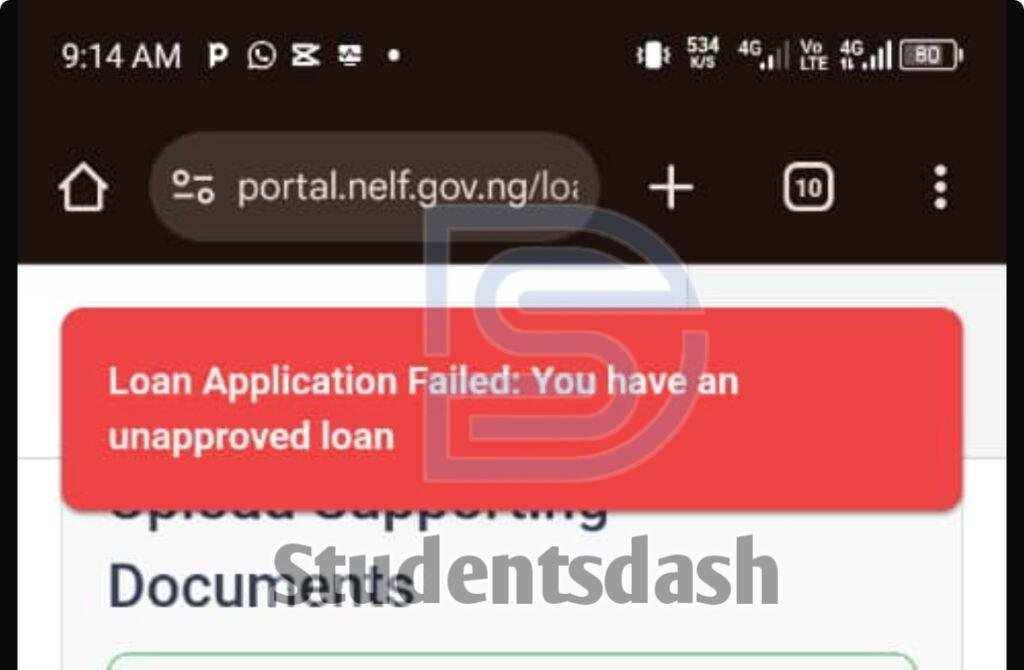
If you tried applying for the NELFUND Student Loan and saw this read message 👇
Loan Application Failed: You have an unapproved loan don’t panic, it’s not an error from your side. Let’s explain what it really means and how to fix it.
Why You’re Seeing “Unapproved Loan”
The reason you’re seeing this message is because your previous loan (either for school fees or upkeep from the last session) is still showing as verified or pending in the NELFUND system.
In simple terms, your last loan application has not been fully settled yet.
What That Means
Until NELFUND either disburses, stops, or cancels that previous loan, you can’t apply again for a new one.
The system automatically blocks new applications until the first one is completely resolved.
What You Should Do
Here’s what to do if you get this message 👇
- Be patient.
Wait for NELFUND to either release (disburse) your last loan or cancel it if it wasn’t approved. - Keep checking your dashboard.
Log in to https://portal.nelf.gov.ng and watch for any changes on your loan status. - Check your email.
NELFUND usually sends updates to your registered email, so don’t forget to check your inbox and spam folder. - Once the old loan is disbursed or canceled, you can reapply successfully.
Extra Tip from Studentsdash
If you’re not sure whether your last loan is still pending or already approved, message us on WhatsApp 👉 07075012541
We’ll help you check your loan status and guide you on what to do next.
Final Words
Don’t worry this issue is common and temporary. Once NELFUND clears your previous loan, you’ll be able to apply again without any problem.
Stay calm and keep following Studentsdash for more NELFUND loan updates and student tips. 💪
Follow Studentsdash
Get the latest admission updates, school news, NELFUND information, scholarships and important announcements directly on Telegram and WhatsApp.
Stay connected so you don’t miss important student updates.